Last winter, my buddy Ryan called me from Broad Ripple. His brand-new Wi-Fi thermostat had gone dark again. He'd pop in fresh batteries, it'd work for a few days, then the screen would flicker and the heat would shut off at 2 a.m. He was ready to throw the thing in the trash. Turns out, the thermostat wasn't broken—it was starving for power. The fix? A little wire most people never think about. That's what we're talking about today: the C-wire, also called the common wire, and why your smart thermostat might need one.
What is a C-Wire?
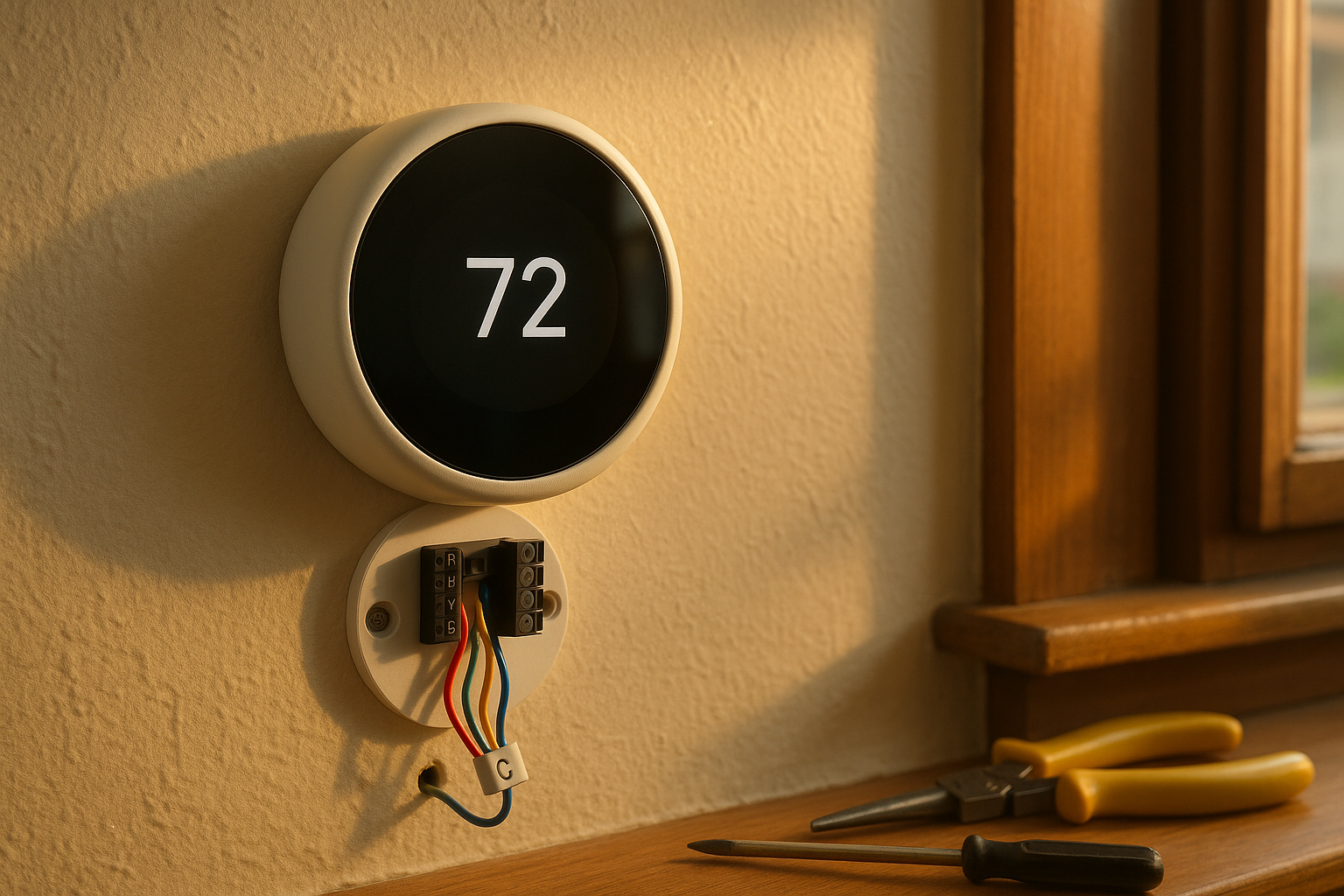
Think of your thermostat like a phone. The control wires—usually red, white, yellow, and green—are the buttons you press. They send signals to your furnace or air conditioner: turn on heat, turn on cool, run the fan. The C-wire is the charging cable that keeps the phone awake all the time. It provides a continuous 24-volt power source from your HVAC system back to the thermostat.
Most older thermostats ran on batteries or borrowed tiny amounts of power from the control wires. That worked fine for simple on/off switches. But smart thermostats are mini computers. They need steady power to stay connected to Wi-Fi, run the screen, track learning schedules, and talk to your phone. Without that constant juice, you get flickering screens, dropped connections, and a thermostat that can't do its job.
Do You Actually Need a C-Wire for a Smart Thermostat?
Not every single smart thermostat needs a C-wire. Some brands claim they can run without one by "power stealing" from other wires. But here's the thing: power stealing works okay if all you do is change the temperature. The moment you add a humidifier, a dehumidifier, or an air purifier to the mix, that trick falls apart. The thermostat needs more power than the control wires can spare. And in Indianapolis, with our humid summers and dry winters, a lot of folks want those extra comfort features.
Signs you need a C-wire: your thermostat restarts at random times, the Wi-Fi drops every few days, the batteries die too fast, or the screen goes blank when the heat kicks on. If you've ever woken up cold because the thermostat rebooted overnight, you already know how annoying this is. I've heard this story more times than I can count from neighborhoods like Meridian-Kessler, Irvington, and Fountain Square. Old houses, new tech—they don't always play nice together.
How to Check Your Current Wiring
If you're curious, you can check your own setup. First, turn off power to your furnace at the breaker. Then pull the thermostat off its base. Look at the wires coming out of the wall. Count how many you see. Most simple systems use four or five wires. The colors usually follow a pattern: red for power, white for heat, yellow for cooling, green for fan, and blue or black for common. But colors can be wrong, so don't trust the color alone.
Next, head to your furnace or air handler. Find the control board—usually behind a small metal panel. Look for a terminal labeled "C" or "COM." If a wire is already landed there, and that same wire is tucked behind your thermostat, you're in luck. You have a C-wire. If the C terminal is empty, or if you don't see an extra wire at the thermostat, you've got some options.
A quick note: many newer homes in Geist, Franklin Township, and the northwest side already have extra conductors in the wall. Builders ran 18/5 or 18/8 cable even if the original thermostat didn't use all the wires. In that case, you might just need to connect the unused wire at both ends. But in older homes around Broad Ripple or Fountain Square, you might only have four wires and no spare. That's where things get a little more involved.
No C-Wire? Here Are Your Options
If you don't have a spare wire, you have a few paths forward. Let's break them down honestly.
Option 1: Run a new thermostat cable. This is the most reliable fix. We pull a new 18/5 or 18/8 wire from your furnace or air handler up to the thermostat. It gives you a dedicated C-wire plus extra conductors for future accessories. The downside? If your thermostat is on an interior wall with no clear path from the basement or attic, fishing the wire can be tricky. But in most Indianapolis homes, we can do it without tearing up drywall. We've run wires through basements, crawlspaces, and attics in Zionsville, Noblesville, and Greenwood. Just takes patience and the right tools.
Option 2: Use a power extender kit (PEK). Some manufacturers, like Ecobee, include a PEK. This little gadget reuses one of your existing wires to carry both power and a signal. It's a decent solution if you can't run new wire easily. But it's not perfect. A PEK can limit how many accessories you can hook up later. And if the PEK fails, you're stuck until a new one arrives. I've seen them work fine for years, but I've also seen them cause mysterious glitches. My opinion? If the wall is accessible, run the new wire. It's cleaner.
Option 3: Convert the G-wire to a C-wire. Your green wire normally controls the fan independently. You can repurpose it as a common wire, but then you lose manual fan control from the thermostat. For many people, that's fine—the fan still runs when heating or cooling calls for it. But if you like to run the fan for air circulation without heating or cooling, you'll miss that feature. This works, but it's a compromise.
Option 4: Add an external transformer. You can plug a small 24V transformer into an outlet near the thermostat and wire it to the C terminal. This works, but it's ugly—you've got a cord hanging down the wall. Most homeowners don't want that. We rarely recommend it.
Heat Pumps, Humidifiers, and Other Complications
Now, if you have a heat pump or a dual-fuel system, the wiring gets more complex. Heat pumps use extra wires for the reversing valve and sometimes auxiliary heat. A heat pump thermostat c wire requirement is the same as any other low-voltage system, but you need to make sure you don't steal a wire that's doing something important. Same goes for whole-home humidifiers or dehumidifiers. Those accessories often need their own control wires back to the furnace. If you're planning to add a humidifier for those dry January days, or a dehumidifier for muggy July, you need a thermostat that can handle the extra load—and enough conductors to wire it up.
We talk about dehumidifier sizing and Indiana humidity in more detail in this post. And if you're upgrading your thermostat to control indoor air quality, you'll want to check your furnace filter and MERV rating too. A clean, high-quality filter plus a smart thermostat with a C-wire can make a huge difference in how your house feels.
Why a Clean Install Matters in Indianapolis
I've worked in homes all over Marion County and the surrounding burbs. Older neighborhoods like Meridian-Kessler and Irvington have plaster walls and finished basements. Running a new wire means drilling small holes and fishing through wall cavities. It can be done, but you want someone who knows how to avoid hitting pipes or old knob-and-tube wiring. Newer homes in Avon, Plainfield, and Brownsburg usually have easier access—unfinished basements or open attics. But every house is different.
One thing I'll say: don't let just anyone poke around your furnace control board. A wrong connection can blow a fuse, damage the board, or even mess up your heat pump. That's an HVAC job, not a general electrician's job. We know low-voltage controls, thermostat wiring colors, and how to label every conductor before we disconnect anything. Safety first.
Costs vary. It depends on how far the wire has to travel, whether we're in a tight crawlspace or an attic with blown insulation, and whether you're adding accessories. Most C-wire additions are done in one visit—usually under two hours. If we're also installing a new smart thermostat and a humidifier or dehumidifier, plan for a half day. Not a big deal, but good to know.
Ready to Add a C-Wire? Let's Talk
If your smart thermostat keeps losing power, or if you're thinking about upgrading and want to do it right, give HVACPros a call. We'll come out, check your wiring, look at your furnace control board, and give you a straight answer. No pressure, no upselling. We'll tell you if you can get away with a PEK, or if running a new wire is worth the extra effort. Then we'll do the job clean, label everything, and test the system end to end.
We work all over Indianapolis, Carmel, Fishers, Zionsville, Westfield, Noblesville, Greenwood, Brownsburg, Avon, and Plainfield. Our goal is simple: make your house comfortable and your thermostat reliable. Spring and fall are great times to schedule this kind of work—the weather's mild, and you won't be without heat or AC for long. If you're ready to stop babysitting your thermostat, book a local evaluation here. We'll help you get that C-wire in place and your smart thermostat running like it should.
Ready for HVAC service or an upgrade?
NATE-certified techs, flat-rate diagnostics, and a free in-home assessment for any replacement — no pressure.